design exercise
An insurance copilot, rebuilt for the pocket.
The brief
A take-home exercise for a Product Designer selection. Reimagine Navisio, an AI copilot for insurance professionals, as a mobile app. Not a port of the web product, but something conceived natively for the phone. Full freedom on features and fidelity. One single constraint: respect the brand palette.
The product
Navisio AI is a copilot for insurance intermediaries, brokers, agents and consultants. On the web it reads, compares and explains insurance documents: policies, general conditions, information sets, quotes and claims, with traced sources and a large product library. Its core value is giving back time.
My approach
The interesting word in the brief was natively. A phone is not a smaller monitor, it's a different moment: the broker is with a client, between appointments, on the move. So the real job wasn't shrinking the web app, it was deciding what actually matters in that moment and building around it.
Deliverables
A mobile information architecture, two written product proposals reasoning about how features should translate to mobile, a Figma component library with a custom navigation pattern, and the key flows: login, home, the AI chat (text, voice and documents), analysis and risk analysis.
The only hard constraint was the brand palette, so I treated it as the backbone of the system rather than a coat of paint at the end. Navisio's orange carries the AI: it marks the assistant, the active state, the primary action. Night blue grounds the brand surfaces. Everything else stays quiet so those two do the talking.
I worked the way the product itself demands: reasoning first, screens second. From mapping what a dense web tool actually does, to deciding what survives on a phone, to writing the product logic down before drawing it, to building a component system rather than a stack of screens.
01 - audit
Reading a dense desktop tool
Product audit
Jobs in context
Desktop vs mobile
02 - architecture
From a wide web app to five thumb-sized sections
Information architecture
Prioritisation
Mobile IA


03 - product reasoning
Writing the logic before drawing it
Product proposals
Edge cases
Trade-offs
04 - system & ui
A component library, not a pile of screens
Figma components
Variants
Design tokens
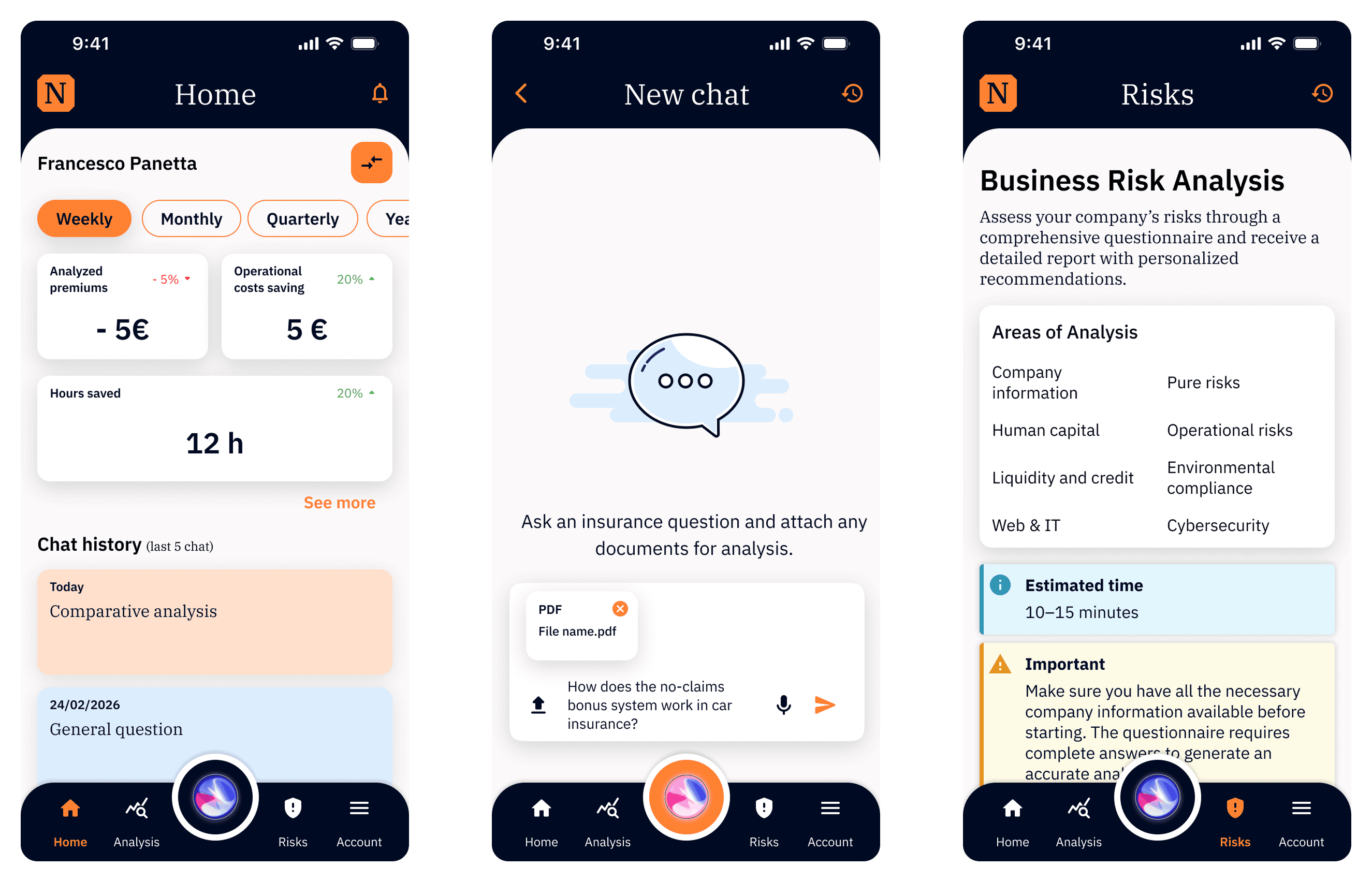
If the AI is the product, it should be the easiest thing to reach. So the assistant lives at the physical centre of the navigation, a floating orb sitting in the middle of the tab bar, always under the thumb. The four sections sit around it; the AI is one tap from anywhere. On a phone this is the difference between a tool you open and a tool you talk to.
Navigation
Native-mobile rationale.
A desktop puts the assistant in a sidebar among equals. A phone has one reachable zone, the bottom centre, and that's where the product's core value belongs.

Proposal 01 • Analytics & Compare
The web Analytics view shows aggregated team data. Useful for an overview, but it hides individual performance behind an average. I proposed a dedicated Compare feature: pick two or three team members, generate a custom averaged view, and benchmark against specific peers instead of the whole team. Crucially, it's governed by role-based access, so company admins control who can be compared and what's visible. I kept Compare separate from the main Analytics view to reduce cognitive load on a small screen.
Why it matters
It shows I design with permissions, roles and organisational structure in mind, not just the happy path of a single user.


Proposal 02 • AI Chat for Comparative Analysis
On the web, comparison lives in structured Analysis and Recommendation sections, rigid for someone who'd rather just ask. I proposed extending the AI Chat to handle comparisons: upload the documents, ask in plain language, get structured output that mirrors the existing Analysis logic so results stay consistent and trustworthy. The key constraint, written explicitly: avoid forcing complex tabular comparisons onto mobile, keep the chat as an alternative entry point rather than a replacement, and keep Excel export for the detailed desk work. Clear limits on file count and size, with immediate feedback when they're exceeded.
Why it matters
It's the clearest example of native-mobile thinking: same capability, re-expressed in the interaction model the device is actually good at, without breaking consistency with the existing product.


01 • Login
A dark, brand-led welcome ("the AI assistant for insurance professionals"), then sign-in by email or phone, social login and passkey. Small touches matter: the Continue button sits disabled in grey until the field is valid, then turns brand orange. State communicated through colour, the way the rest of the app works.

02 • Home
A mini-dashboard with the numbers that justify the product, premiums analysed, operating costs saved, hours saved, switchable across weekly, monthly, quarterly and yearly. Below it, recent chat history for one-tap resume, and the new Compare entry point. It answers "is this saving me time?" before anything else.

03 • Chat - text
The assistant opens on a friendly empty state ("What can I do for you?") with a new chat or example questions to start from. Answers come back in branded cards, with the source documents attached and an export to PDF or Word through a bottom sheet. History keeps past conversations one tap away.

04 • Chat - voice & documents
A full voice mode: tap to speak, watch the audio visualiser respond, see the spoken phrase transcribed back. Asking a coverage question out loud, in the car or in front of a client, is something the desktop simply can't offer. Documents can be attached from Browse or Recents and analysed in place, so the phone becomes a capture point, not just a viewer.

05 • Analysis
The Analysis hub keeps the document workflows intact, policy and information sets, information sets, quotes, as clear entry cards. Structure stays for the work that needs it; the chat is the shortcut for everything else. Both coexist instead of competing.

06 • Risks
Business Risk Analysis presents its eight areas up front (from company information to cybersecurity), shows an honest estimated time, and flags what's needed before starting. Setting expectations before a long task is its own form of respect for the user's time, the same principle that drives the whole app.

What I'd validate before building
Pressure-test the voice mode with real jargon.
Insurance language is dense and regional. I'd check transcription and intent accuracy on actual clauses and dialects before trusting voice as a primary input.
Confirm the AI-centred navigation with real intermediaries.
Putting the assistant at the centre is my central bet. I'd watch brokers use it on-site to confirm the orb reads as "the AI", not as an unlabelled mystery button.
Define the desktop handoff.
The phone is for the quick and the on-the-move; the desk is for deep comparison. The next step is designing how a conversation started on mobile continues seamlessly on the web.